
Keep orders moving
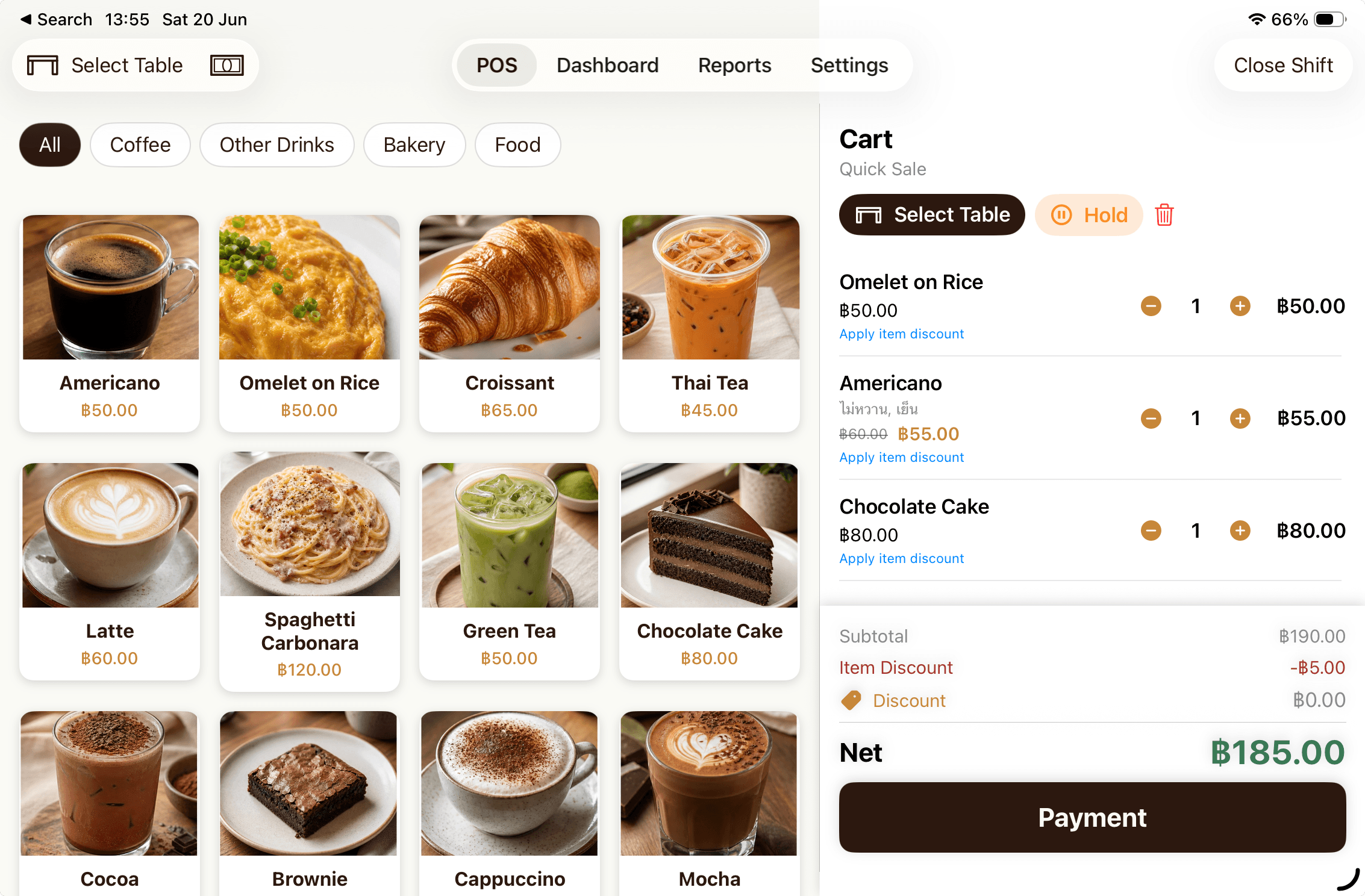
Photo menus, sizes, sweetness and toppings. Add notes, hold orders and apply item or order discounts.
FOR CAFES, BAKERIES & SMALL RESTAURANTS
From the first order to closing time, keep sales and daily operations together. CafePOS brings QR ordering, kitchen displays and helpful new tools to your iPad or iPhone.
30-day free trial · iPad & iPhone · iOS 18.6 or later
MADE FOR YOUR EVERYDAY
Start with the work you do every day. Add the tools that fit your shop when you are ready.
Photo menus, sizes, sweetness and toppings. Add notes, hold orders and apply item or order discounts.
Record cash, PromptPay, card and custom transfers. Combine payment methods on one bill and calculate change.
Manage orders by table, combine tables and hold an order so your team can pick it up again.
Send items, options and notes to the kitchen. Manage the queue and enable automatic kitchen tickets for online table orders.
See sales, popular items and history. Open and close shifts, reconcile counted cash and export CSV or Excel.
Receive and adjust stock, record waste and expiry dates, and set recipes to deduct ingredients. Check low-stock alerts.
Customize your logo and receipt layout, import fonts, set tax and service charges, print on supported devices or share PDFs.
Keep customer records, attach members to orders and configure how guests earn and redeem loyalty points.
Individual profiles and PINs, owner and staff permissions, and optional Telegram summaries and receipts.
QR ORDERING
Guests browse your menu, choose options and send orders from their phones without installing an app. Your team takes it from there in CafePOS.
Open table-specific QR sessions, control their expiry and close ordering when the table is done.
Guests can add items while their table QR session stays open.

QR ordering needs internet access. Keep CafePOS open on the main device to receive orders.
STORE DISPLAYS
Use a phone, tablet or computer browser as a helpful shop display. Join the same Wi-Fi, scan a pairing QR and approve the device from your POS.
 Main CafePOS deviceSame shop Wi-Fi
Illustrative displays
Show items, totals and payment details. Customize the welcome image with a photo from your shop.
Show which orders are being prepared and which are ready, so guests can follow their queue.
Give the kitchen items, modifiers and notes together, with controls to update preparation status.
Use a trusted staff network and keep CafePOS open on the main device. Local displays can work on shop Wi-Fi without internet access.
MORE TOOLS FOR YOUR SHOP
From the label on a cup to moving your shop data to a new device, keep the details in order.
Cafe, food and bakery templates with names, options, queues and notes. Select categories, preview labels and enable printing after payment or kitchen handover.
Automatically save receipts to the CafePOS album in Photos and store payment proof images when confirming payment, with Photos permission enabled.
Back up settings and sales history by store and device. Restore when moving devices, or export your settings as a file.
Receipt and label printing depends on the supported model and connection. Test your actual printer before enabling automatic printing.
BUILT TO KEEP THE COUNTER MOVING
Core menus, orders, inventory and reports live on your shop device. Connect online services when you need them.
Take counter orders, generate PromptPay QR codes and read local reports. Close shifts after resolving outstanding orders flagged by the app. Staff verifies receipt of payment.
Customer, queue and kitchen displays need a connection to the main device on shop Wi-Fi, with CafePOS kept open.
QR ordering, iCloud backup, Telegram and Pro subscription management connect to their respective services.
SIMPLE PRICING
Try unlimited orders for 30 days. Then keep using the free plan or choose CafePOS Pro for unlimited orders.
After the trial, the free version is limited to 20 orders per day.
Unlimited ordersStart your free trialBest for shops that want to start with a monthly plan.
Unlimited ordersView plans in the appOne payment for a year of service.
Unlimited ordersView plans in the appPrices shown are for the Thailand App Store. Confirm the current price in the app before purchase. Pro renews automatically; manage or cancel through your Apple ID.
An iPad or iPhone running iOS/iPadOS 18.6 or later. Set up your shop and menu in the app. Printers and extra displays are optional, depending on your workflow.
Counter orders, checkout, PromptPay QR generation and local reports work offline. Close shifts after resolving outstanding orders flagged by the app. Store displays need shop Wi-Fi to the main device. Online QR orders, iCloud and Telegram need internet access.
No. Guests scan a QR or open a link to use the mobile web menu. Use table-specific QR sessions or a permanent takeaway QR. Enable online ordering and keep your main device open to receive orders.
Staff checks and confirms receipt of payment. CafePOS can generate PromptPay QR codes and record payments. For takeaway orders, staff reviews payment proof before confirming payment.
Yes. Open a browser on a device connected to the POS network, scan the pairing QR, compare the code and approve its display role from the main app. Keep CafePOS open on the main device.
Supported Bluetooth/Wi-Fi receipt printers and selected label printers, including Xprinter or NIIMBOT B1/B1 Pro, depending on model, profile and connection. Contact the team with your model and test the actual device before using it in service.
iCloud backs up and restores settings and sales history, grouped by store and device. Customer, queue and kitchen displays connect to the main POS through the local shop network.
The free plan allows up to 20 orders a day after the trial. Choose monthly or yearly Pro in the app for unlimited orders. Manage or cancel renewal through your Apple ID Subscriptions.

Start with the iPad or iPhone you have. Add the tools that fit your shop as you go.